

Try Weglot for free


.avif)


Google Translate is brilliant for menus, signs, and quick lookups on the go. For your website, it's a different story. You'll be doing manual work every time you publish, with no built-in SEO setup, no editing control over the output, and no real way to keep translations on-brand. And as we found in our research on Google's AI proxy, Google will even translate untranslated websites and display them under its own domain, sending the traffic somewhere other than your site.
That's why, for website translation specifically, it's worth looking at the alternatives. In this post, we'll walk through the strongest ones, then look at what changes when you treat website translation as its own job rather than a Google Translate task.
A quick note on pricing before we dig in: most website translation tools, including Weglot, offer a free plan or a free trial, so you can test fit before committing. You'll find Weglot's current plans, including the free one, on our pricing page.
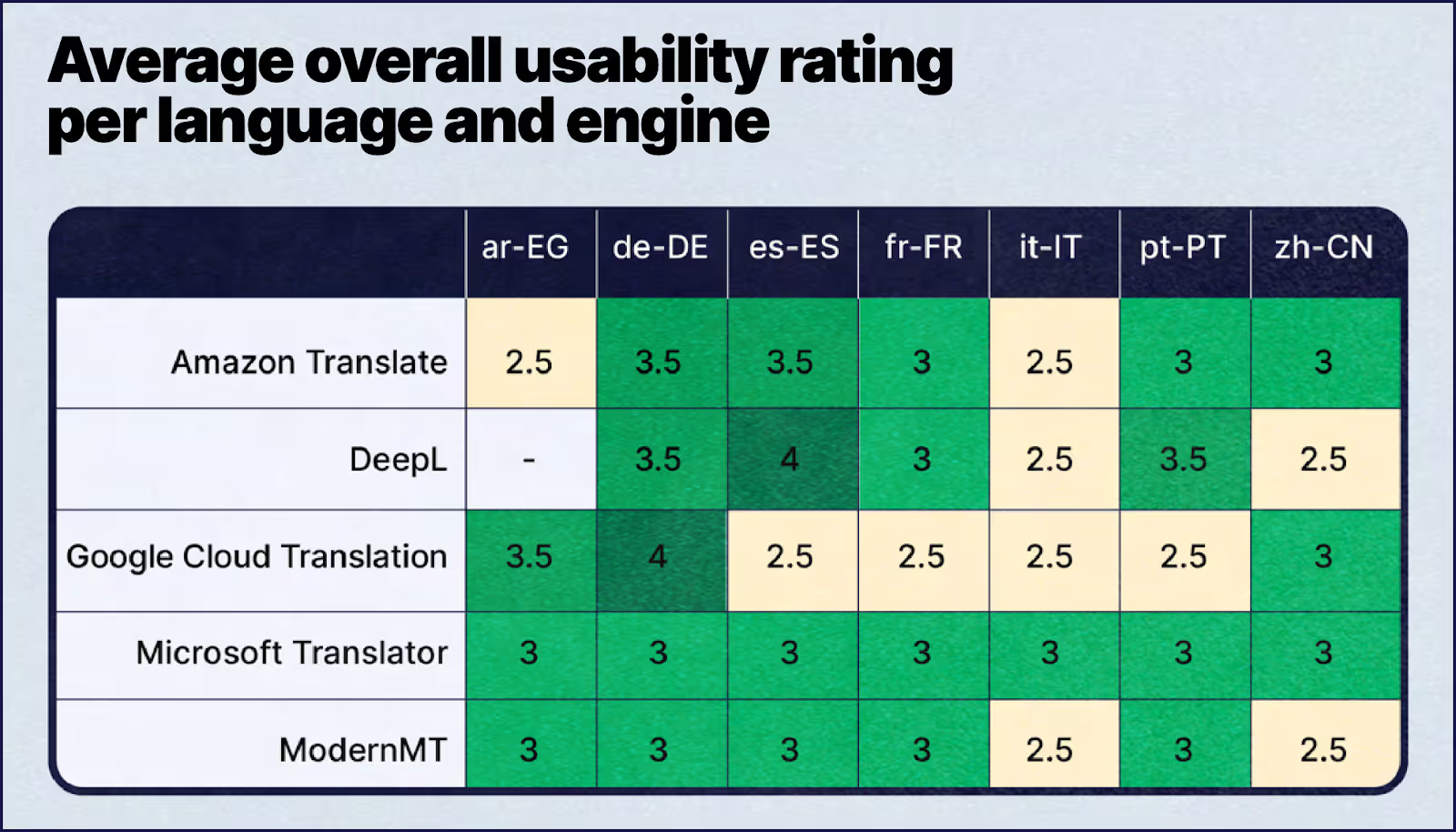
As you can see here from our study with Nimdzi on the state of machine translation, the strongest engine changes depending on the language pair.
Weglot is the best Google Translate alternative for translating a website, turning any site multilingual in minutes, tech-free, with multilingual SEO and GEO handled.
Translating a website is a different job from translating a sentence on your phone. You're not translating once and moving on. You're keeping a whole site translated as you publish, with every page served under a search-friendly URL, hreflang tags in place (the bit of code that tells Google which language version to show which visitor), and your product names reading the same way in every language.
Rather than replacing the engines you already know, Weglot orchestrates DeepL, Microsoft Translator, and Google Translate under the hood, routing each language pair to whichever performs best for it. So you get the strongest engine for every language without managing three separate accounts. Our complete guide to automatically translating any website walks through what that looks like on a real site.
Want to see it on yours? The free plan covers smaller sites, so you can translate your site free before you commit to anything.
Let’s take a look at other alternatives. Four of them are best for translating text, documents, or conversations one at a time. The fifth, Weglot, is the one built for translating a whole website and keeping it translated.

DeepL is strong on European-language accuracy for one-off text and documents. Weglot routes to DeepL automatically when it's the best engine for your language pair, so that accuracy lands on your website without you managing DeepL yourself. Fun fact: it was developed with Linguee, a popular online multilingual dictionary also known for its quality translations.
On English to German, French, and Spanish, DeepL edges out Google Translate on quality, and those are exactly the pairs Weglot uses DeepL for.
Our own study comparing DeepL and Google Translate also found DeepL needed the fewest human corrections of the two, which is part of why it's one of the three engines we route to.
Plus, DeepL provides an API for automatic website translation, just like Google Translate. You can also use its web interface and applications to translate text files (.pdf, .docx, or even .pptx files) and textual content.
DeepL has expanded well beyond its original European core and now covers more than 200 languages, though Google Translate's range is still wider. While most of these languages are European languages like Polish and Portuguese, DeepL also supports Chinese, Indonesian, Turkish, Japanese, and Korean.
Both DeepL and Google offer a free monthly character allowance on their APIs and then charge per million characters. Check their current pricing before you budget, because per-character API rates move.

Available through Microsoft’s Cognitive Service, Microsoft Translator is found throughout many familiar products: Bing, Office, Microsoft Edge, and more.
Microsoft Translator is a solid pick for live voice translation and Office workflows. Weglot uses Microsoft as one of our three engines too, choosing it for the language pairs where it performs best. It covers over 100 languages, though Google Translate's range is now far wider.
It also performed well in our study with Nimdzi on the state of machine translation for websites, where it scored a 3 out of 4 in ranking its overall usability and rating for all seven languages.
As a bonus, it was also the only translation provider to score consistently across all tested languages, which is one of the reasons it earns a place in our engine mix.
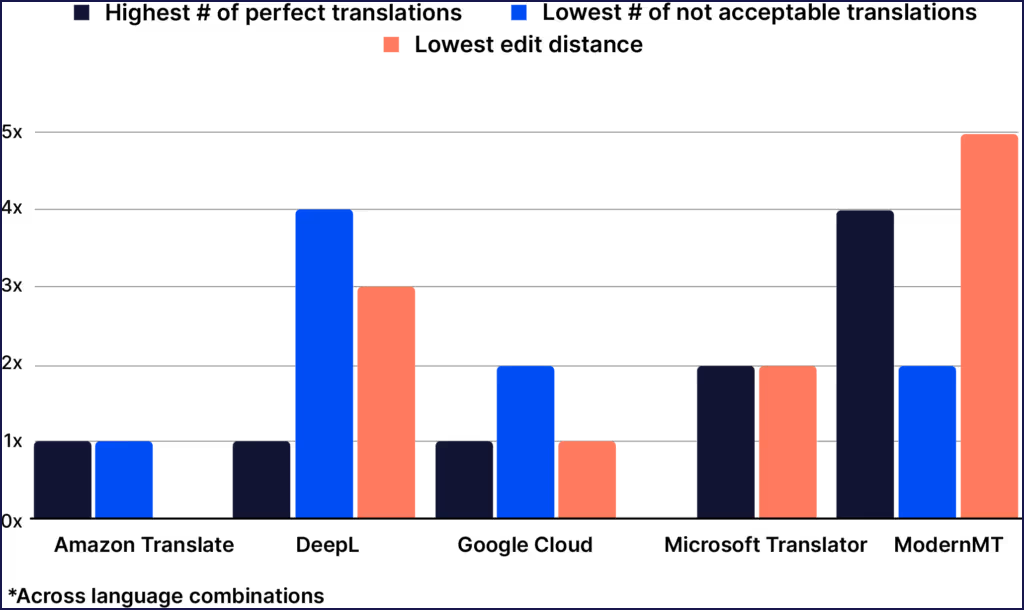
For German it scored highest of all the engines we tested on translations that needed no editing, which is exactly the kind of per-language difference our routing is built to take advantage of.
Microsoft's API comes with a free trial and a free monthly character allowance, and its paid rates undercut Google's on volume. Both publish current rates on their own sites.

Amazon Translate is best suited to teams already building inside AWS who want translation running in their own infrastructure. Amazon Translate is the ecommerce giant’s machine translation service, which belongs to its cloud-based suite of offerings, Amazon Web Services.
What sets this apart from the other alternatives is that you can access it only from the AWS Management Console or an API. So you can’t quite use it on-the-go to translate like you can with Google, DeepL, and Microsoft.
You can use Amazon Translate to translate your website, documents, create custom terminology, configure formalities in language, and even cover up profanity. It also supports 75 languages and over 5,500 translation combinations.

Moreover, it provides real-time translation in email, helpdesk, chat, and ticketing applications so that agents can communicate in the languages of their customers.

Amazon Translate is quickly rising to be a high-quality machine translation provider. In our study with Nimdzi, they scored one of the highest in no-touch translations as you can see in this graph here. That means translators corrected Amazon Translate’s output much less frequently than some others.
Amazon Translate is free for 12 months on the AWS Free Tier, and charged per million characters after that, with higher rates for real-time document and custom translation. AWS publishes the current rates on their pricing page.

Reverso is best for checking and improving text you're translating for yourself, rather than for publishing translations on a site. Reverso is a machine translation software for text and documents. It’s available through their website, but they also have apps for Mac, Windows, iOS, Android, and even browser extensions for Chrome and Firefox.
It comes with an integrated grammar checker, so it automatically corrects errors in your original text with an AI-based spell checker, giving you higher-quality translations.
Its integrated dictionary allows you to modify your translations and fine-tune them for even better quality, suggesting synonyms and offering in-context translation examples.
Reverso is free to use within word and character limits, with a paid Premium tier that lifts them. Their current plans are on their pricing page.
For a wider view, compare the best website translation tools and services.
Want to see how AI website translation performs on your own content?
Before committing to any tool, you can run a few of your own pages through our AI Translation Quality Checker. It scores the output on accuracy, fluency, and brand consistency, so you can compare what AI website translation actually looks like for your site, in your language pairs, before you sign up for anything.
{{tools-banner}}
Now, if you’re looking for a Google Translate alternative specifically to translate your website, consider Weglot. An AI website translation tool, it uses 3 different translation providers (DeepL, Microsoft and Google Translate based on the accuracy of the language pair) and supports over 110 languages, so you’ll always get the most accurate translations for your site.
But unlike using Google’s Cloud Translation AI, you don’t need to manage its API integration to use it. We work with any CMS, and your translated site goes live in minutes rather than at the end of a development project.
Weglot has a free plan for small sites and a 14-day free trial on all paid plans. Plans scale by word count rather than per-character API charges, so your cost is predictable as your site grows. The current tiers are on our pricing page. Paid pricing starts at $17/month.
If you've made it this far, you might be wondering: if Weglot uses Google Translate as one of its translation providers, why not just use Google Translate directly?
The short answer is ease of implementation. Google Translate gives you a translation engine; Weglot gives you everything you need around the engine to actually run a multilingual website. That includes a tech-free install on any CMS, automatic detection of new content, SEO setup that follows Google's own best practices, and full editing control – none of which Google Translate handles on its own. The result: a translated, SEO-ready, brand-consistent site live in minutes, not a developer project that drags on for weeks.
So comparing them is a bit like comparing an engine to a car. You can build a car around an engine yourself, but that's a different project than driving one.
Here's how the two stack up specifically for translating a website:
"AI website translation" is one of those phrases that can mean anything, so we want to be specific about what we do.
When you connect Weglot to your site, our AI Translation Model handles the first pass automatically. It pulls from three translation engines – DeepL, Microsoft Translator, and Google Translate – and picks the best one for each language pair, based on which engine performs strongest for that combination. You don't choose; the routing is automatic.
From there, the AI Translation Model layers on three things that a raw machine translation engine can't do on its own:
For most sites: very little, especially after the first pass. Standard content (product descriptions, blog posts, support pages, marketing copy) is typically publishable as-is or with light review. Brand-specific terms and high-stakes pages (homepage, pricing, legal) tend to benefit from a human pass, which you can do directly in the Visual Editor without touching your CMS.
If you want zero manual work, you can publish translations automatically as soon as they're generated. If you want full control, you can require a review step before anything goes live. Most teams land somewhere in between: auto-publish for low-stakes pages, and review for the rest.
You can refine the translations that matter in two ways:
You can also invite teammates, external translators, or agency partners into the dashboard and assign them specific languages, pages, or sections.
Google Translate is a wonderful tool that fulfills quick, personal translation needs: understanding foreign menus, signs, or basic instructions.
But when you’re looking for a tool that will deliver accurate website translations, there are tools out there that are much better suited to the task.
A crucial part of translation is ensuring it has perfect grammar and spelling, especially when it’s customer-facing content.
Google Translate isn’t capable of proofreading translations or detecting if there are errors in the original text.
You can’t edit any of the translations it suggests, either, so you’ll have to stick to whatever Google Translate offers.
Plus, Google has since discontinued the Contribute feature, which allowed users to submit suggestions to translated content to increase the quality. The output will still be human-informed, but it’ll be the product of its systems evolving and learning rather than real people suggesting translations based on nuance and context.
Google Translate is available in close to 250 languages, so it offers the broadest spectrum of language support. But because it covers so many languages, it can’t provide the same level of quality for all 60,000-plus language pairs those combinations create.
Previously, you could add the Google Translate Widget to your site that would display the translated content for you (note: this is still possible, but only if you're using it for a non-commercial website). So, you’ll need a developer to create a special workflow so that you can integrate the Google Translate API into your website.
You’ll have to configure Google Translate to upload your translations each time. Any time you translate new content or add something to your site, you’ll have to manually run it through the API to translate it for you.
Then, you’ll have to set it up so that it displays these translations each time – taking up time you could spend on more productive tasks. That’s a lot of manual work and potential copy-pasting involved!
A crucial part of reaching your audience – especially in a brand-new market – is optimizing your content for search engine performance in their respective areas.
However, because of the way the tool works, it doesn’t send signals to search engines to index the newly translated content on your web pages.
You’ll have to manually add attributes like hreflang tags, set up your translated websites under subdirectories or subdomains, and overall miss the many advantages of multilingual SEO.
Google Translate’s interface is designed for individual users, blocking collaboration. However, alternatives allow you to add team members to your project and manage your translations together.
Google Translate is perfectly fine for certain use cases and it can deliver fast, fairly accurate translations. But for things that require a lot of context – like your marketing materials and website – the tool itself won’t suffice since it’ll need a human eye to verify its output.
That said, Google Translate is excellent at providing translations for these functions:
The same goes for general AI chatbots. They can produce a good translation of a paragraph you paste in, but they won't publish it on your site, keep it updated as you publish, or handle the SEO side, which puts them in the same quick-lookup bucket as Google Translate.
Finding the best translation tool completely depends on your needs and what you’re looking for. We at Weglot find Google Translate very useful for providing a first layer of translation to your website in over 110 languages, which is why it’s one of the providers we use, along with DeepL and Microsoft Translator.
While Google Translate is a powerful translation provider, it’s not necessarily the best tool if you want to make your website multilingual.
Unlike the process of integrating Google Translate’s API with your website, translating your website (which can still involve Google Translate) with Weglot takes only a few minutes.
Here’s a quick video on how easy and user-friendly it is to install Weglot on your site – no coding or developers needed:
Weglot also has integrations with your favorite CMS, whether WordPress, WooCommerce, Shopify, Squarespace, Wix, Webflow, you name it.
Once you connect Weglot to your site, pick your site’s current language and what language you want to translate your site into, whether Spanish, Russian, Arabic, Dutch, and more. Then Weglot takes over.
After your translation is ready, Weglot automatically displays it under a unique subdomain/subdirectory of your current site’s URL. For example, Weglot’s main site is weglot.com. But our French site is weglot.com/fr/, and the Italian one is weglot.com/it/. That subdomain was automatically set up for us in our target languages without any effort.
Weglot is designed to do the bulk of the work for your translation needs. At some point, you may end up needing to edit your translated content, depending on your website and industry.
To make things easier, you can access all of your translated languages in your Weglot Dashboard – whether they’re AI translations or translations done by human translators.

You can find a specific translation by:
You can click the translation you want to edit, make the changes, and then save them. All changes are updated automatically on your CMS.
You can also find a professional translator through Weglot. Simply pick which content you want to be translated/reviewed by a professional, and then the job is sent to a qualified translator.
Once the translator has finished translating, the content is automatically updated and live on your site.
Plus, you can set up glossaries with specific translation rules, such as excluding specific words, phrases, pages, or blocks from translations.
When Weglot translates your CMS, it also helps with your new site’s multilingual SEO. This helps your site rank for the right audience regardless of the search engine.
Weglot helps with SEO by:
Website localization is a key part of offering an excellent user experience for your audience, as it presents your content in their context.
With Weglot, you can easily localize your website and adjust your messaging so that it contains the colloquialisms, references, and more of your target audience. This is possible not just by editing your content but translating your media, too – something definitely not possible with the current state of Google Translate.
What's more, our AI Translation Model combines the three translation engines with your own brand voice and glossary, so the output reads like you rather than like a translation. Discover more with our guide to AI localization.
While Google is a great machine translation service that provides accurate translations, it doesn’t give websites an easy way to translate their content.
But with Weglot, you get:
Start translating your site with Weglot's free plan, or take a 14-day free trial on any paid plan.

We’ll get your first languages live. You decide how far you want to go. Try Weglot for free today.
Trusted by 70,000+ global brands





Weglot is tested and trusted by brands worldwide since 2016. Join them today.


The best way to understand the power of Weglot is to see it for yourself. Test it for free and without any engagement.
A demo website is available in your dashboard if you’re not ready to connect your website yet.
